🚀 Launch Your MVP & Get a Free 5-Page Marketing Website – Limited Time Offer!
Claim Your Free Website

AI-Powered Automation for MVP Web Apps
App Development
Created:
Jan 19, 2026
Updated:
Jan 31, 2026
AI and no-code tools speed MVP web app builds, cut costs, and automate tasks like lead qualification and support for faster launches.
AI-powered automation is changing how startups build Minimum Viable Products (MVPs). By combining artificial intelligence with no-code tools, founders can create smarter, faster, and more cost-effective solutions. Here’s what you need to know:
Faster Development: AI reduces manual work, cutting tasks from hours to minutes and enabling MVP launches in 4–6 weeks.
Cost Savings: No-code platforms and AI tools eliminate the need for large development teams, saving startups thousands annually.
Smarter Features: AI handles tasks like lead qualification, customer feedback analysis, and ticket management, improving efficiency.
Examples: Companies like Popl and Remote have saved time and money by automating workflows with AI, achieving measurable results like reduced churn and increased productivity.
The combination of AI and no-code platforms like Bubble, Glide, and Zapier is making MVP development accessible to non-technical founders while delivering results quickly. Whether it’s automating repetitive tasks or integrating advanced AI APIs, startups can build scalable solutions without traditional coding. Ready to accelerate your MVP launch? Start by identifying bottlenecks, choosing the right tools, and testing small-scale automation ideas.
This Startup Built Their MVP in Just 6 Weeks Using No-Code + AI
Finding Automation Opportunities in Your MVP
Scaling an MVP means identifying bottlenecks that slow down progress or frustrate users. The goal isn’t to automate everything but to streamline the tasks that drag momentum. Nicole Replogle from Zapier calls these "deep sigh" tasks - those repetitive chores that don’t justify a full-time hire but still demand attention. Tackling these tasks can bridge the gap between user pain points and smarter workflows.
Matching User Needs with Automation
The first step is spotting areas of friction. High-impact automation opportunities often fall into these five categories: operational inefficiencies, scalability challenges, fragmented data, limited resources, and user churn.
Dive into customer support tickets or interview transcripts with the help of AI tools to detect patterns that might otherwise go unnoticed. This kind of qualitative analysis can uncover hidden problems, like why users abandon certain features, which often point directly to automation solutions. Once these issues are clear, it’s easier to prioritize features that deliver the most value.
Selecting High-Impact Features for MVPs
Not every automation idea deserves a place in your MVP. To decide, rate each feature on a scale of 1 to 5 based on its impact on workflows (1 = minor irritation, 5 = critical obstacle). Focus only on automations that align with your primary success metric - whether it’s saving time, boosting conversion rates, or improving accuracy. If a feature doesn’t contribute to that metric, it’s not worth pursuing.
Take a "thin slice" approach: build the smallest version that still delivers complete value through AI-powered MVP development. For instance, Popl, a digital business card company, didn’t try to automate its entire sales process all at once. Instead, in December 2025, they tackled a specific pain point - managing hundreds of daily lead submissions flooding their inbox. Their AI system now filters spam, organizes leads by region and company size, and saved the company $20,000 annually.
Testing Automation Ideas Before Building
Before committing to a solution, validate your ideas. Interview 20 users and create user stories that clearly define the problem. Use this structure: "As a [type of user], I want to [achieve this goal] so that [I get this value]".
Sketch out workflows using visual mapping tools before diving into development. Identify where data is collected, when AI should step in, and where human input is necessary. Then, run a pilot test with real data and 5–10 users who fit your target audience. This small-scale test allows you to measure effectiveness without overcommitting resources.
Selecting No-Code and AI Tools
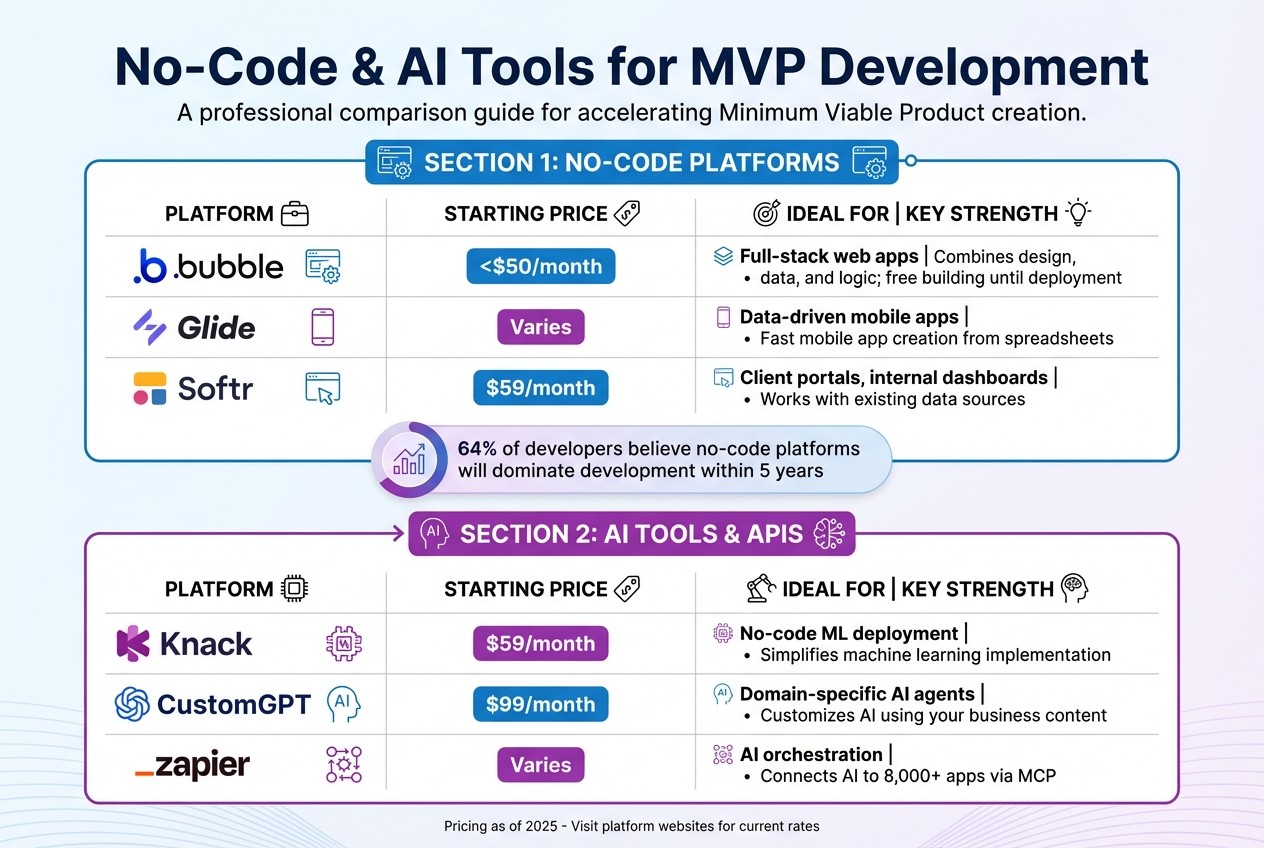
No-Code Platform Comparison for AI-Powered MVPs
When choosing a no-code platform, look for one that brings together design, data, and logic in a single solution. A platform offering full-stack capabilities - covering frontend design, backend databases, and automation workflows - can save time and effort. For instance, Bubble scores highly in this area, while FlutterFlow might require additional backend integrations.
Platforms with built-in AI features are worth prioritizing. These might include app builders that can generate database schemas from natural language inputs or platforms that provide seamless API connections to tools like OpenAI. Take Zapier, for example - it connects with nearly 8,000 apps, supports over 30,000 actions, and has powered 350 million AI tasks. The availability of third-party plugins, templates, and expert support can also indicate a platform’s maturity and help speed up development.
No-Code Platforms for MVP Automation
If you're building a minimum viable product (MVP), different platforms cater to different needs:
Bubble is excellent for full-stack web applications. It allows you to build for free until you're ready to launch, making it ideal for testing and validating ideas without upfront costs.
Glide is a great choice for creating data-driven mobile apps quickly.
Softr, starting at $59/month, focuses on client portals and internal dashboards, leveraging existing data sources.
Interestingly, 64% of developers surveyed in 2024 believe no-code platforms will dominate development within the next five years.
Scalability is another critical factor for long-term success. Platforms like Airtable can handle massive datasets - think hundreds of millions of records - and manage infrastructure, including servers and security, for you. If your project involves sensitive information, check for compliance with standards like SOC2 or HIPAA early on. Some platforms come prepared with these certifications.
Here’s a quick look at pricing and strengths of popular tools:
Platform | Starting Price (USD/month) | Ideal For | Key Strength |
|---|---|---|---|
Bubble | < $50 | Full-stack web apps | Combines design, data, and logic; free building until deployment |
Glide | Varies | Data-driven mobile apps | Fast mobile app creation from spreadsheets |
Softr | $59 | Client portals, internal dashboards | Works with existing data sources |
AI Tools and APIs for Automation
When it comes to AI, integrating models like OpenAI (ChatGPT-4, DALL-E), Anthropic (Claude), Google (Gemini), or DeepSeek AI can significantly enhance your MVP. Zapier plays a pivotal role here, acting as a bridge between AI models and thousands of business apps through its Model Context Protocol (MCP). This setup allows your MVP to perform tasks like CRM updates, email automation, and database management - all without writing custom code.
Start small with straightforward tasks like automating data entry or sending weekly reminders. Once you're comfortable, you can move on to more complex, AI-driven decision-making. For example:
CustomGPT (starting at $99/month) enables you to create domain-specific AI agents trained on your business data.
Knack ($59/month) allows you to deploy machine learning models without needing technical expertise.
As Bubble aptly puts it:
"AI acts as a co-pilot, enabling you to create faster, make better decisions, and spend less time on routine tasks while focusing more on innovation and business logic."
Here’s a breakdown of some AI tools and their key features:
Platform | Starting Price (USD/month) | Ideal For | Key Strength |
|---|---|---|---|
Knack | $59 | No-code ML deployment | Simplifies machine learning implementation |
CustomGPT | $99 | Domain-specific AI agents | Customizes AI using your business content |
Zapier | Varies | AI orchestration | Connects AI to over 8,000 apps via MCP |
Building AI-Powered Automation into Your MVP
Once you've chosen your no-code and AI tools, the next step is to bring them together to create smooth automation. Most successful MVP automations follow a straightforward structure: a trigger event occurs in your app, data is captured, an AI step processes it, the result is saved, and the right people are notified. This flow can be applied to tasks like lead qualification or routing support tickets.
Creating Automation Workflows
To get started, activate your platform's API integration features. For example, if you're using Bubble, you can enable the "Workflow API" to expose data through a public endpoint. This setup allows automation tools like Zapier to pull data from your app using webhooks.
Zapier's three-step workflow - trigger, process, and route - is a great place to begin. Here's how it works: set up a trigger app (your data source), send the data to an AI tool with a specific prompt, and then route the AI's response to its destination, such as Slack, your database, or email. This method can streamline processes like lead categorization, email routing, and sales workflows.
Visual tools like Zapier Canvas can be helpful for mapping out the entire process. Use them to identify data capture points, AI triggers, routing logic, and any human review steps. When crafting AI prompts, opt for JSON format in the output - this makes it easier for automation tools to parse and forward the data. Assign AI a clear role, such as "You are an assistant helping qualify leads", and use variables like {{lead_name}} to map information from earlier steps.
A real-world example of this in action comes from Vendanta. In January 2025, Marketing Operations Specialist Jacob Sirrs implemented automated sales workflows using Zapier. The result? They eliminated 282 days of manual work annually and unlocked a $1 million potential revenue boost by allowing sales reps to focus on closing deals.
"Zapier lets us spin up and test automations in hours, not full engineering sprints." – Korey Marciniak, Senior Manager of Customer Support Strategy and Operations
With your workflows ready, the next step is to embed AI capabilities into your MVP seamlessly.
Adding AI Features
Start by defining the specifics: what actions users take, what the AI handles, and what kind of data (text, images, prompts) gets processed. Pre-built plugins for services like OpenAI, Google Gemini, or Anthropic Claude make it easy to connect to AI models. If your platform supports API connectors, you can use those as well.
Pay attention to user experience. Design app screens to handle "idle", "processing", and "error" states effectively. These dynamic states keep users engaged and help avoid the perception that the app has frozen while the AI works. For instance, the team behind the AI app ELMR-T built their product on Bubble in just four weeks, compared to the four to six months it would have taken with traditional coding. Bubble's built-in tools for managing these details made the process much faster.
For advanced features, incorporate guardrails and logic using filters, paths, and conditional approval steps. This is especially important for sensitive outputs, such as legal or financial text, which should go through human review before being finalized. If you're using ChatGPT integrations, make sure to fill out the "Memory Key" field with a unique identifier, like an email address. This allows the AI to "remember" and continue conversations across workflows.
Take Remote.com as an example. In 2025, their three-person IT team used a Zapier and ChatGPT workflow to handle 1,100 tickets monthly for over 1,800 employees. The system classified issues from Slack and email, searched past tickets for solutions, and generated responses. It automatically resolved 28% of support requests, saving the team over 600 hours each month.
Testing and Debugging Your MVP
Testing is crucial to ensure your MVP runs smoothly. Use your no-code platform's built-in tools - like Bubble's "preview mode" and "debugger" - to verify that data flows correctly between your app and the AI model. Also, check that AI responses are saved accurately in your database for each user. Security is another priority: confirm that AI tools can't access sensitive user data and that responses are private to the user who triggered them.
Here are some key testing tips:
Use fictional names, like superheroes, to easily distinguish test data from real user entries.
Ensure every piece of data from the trigger app maps to the correct field in the destination app.
Keep a log of AI inputs and outputs in a tool like Notion or Airtable to spot "silent failures".
Break complex tasks into smaller steps (e.g., Step 1: Summarize, Step 2: Classify, Step 3: Generate Reply) to improve reliability.
Zapier allows unlimited testing of workflow steps without consuming "tasks", while Make charges "operations" for similar activities. This can help cut costs during the debugging phase when you might run dozens of tests.
Finally, conduct usability testing with potential users to uncover issues you might miss during internal testing. Test the app with different user accounts and scenarios to ensure permissions and access levels work as intended. Combining technical validation with real-world testing ensures you can launch your MVP in 45 days with confidence.
Improving and Scaling Your MVP with AI Automation
Launching your MVP is just the starting point. The real work begins as users engage with your features and you gather performance data. AI workflows need constant monitoring and adjustments to keep up with your growing business.
Collecting User Feedback and Analytics
To understand how users interact with your AI features, set up tools like Mixpanel or PostHog. These can help you pinpoint where users hesitate or where AI outputs fall short. For immediate feedback, trigger surveys right after users interact with automated features - like when a support ticket is resolved or a report is generated.
Keep a log of all AI inputs and outputs (ensuring personal data is removed) to monitor for issues like model drift, tone inconsistencies, or recurring errors. For instance, Remote used this approach to handle 1,100 monthly tickets with just three IT staff. By analyzing patterns in their ChatGPT and Zapier workflow, they achieved a 28% automatic resolution rate, saving over 600 hours monthly. Additionally, tools like Hotjar or FullStory can provide session replays, showing how users navigate your AI features and revealing friction points that traditional analytics might overlook.
Use these insights to refine and optimize your workflows without delay.
Updating Automation Workflows
Review weekly usage data to identify one area for improvement, then implement a focused, measurable update. ActiveCampaign adopted this strategy to tackle a 25% churn rate among new users. They created an AI-driven onboarding system using webhooks and Zapier, which automatically tagged users by language and enrolled them in tailored webinars. The results were striking: webinar attendance surged by 440%, 90-day churn dropped by 15%, and product adoption doubled within 30 days.
When rolling out updates, feature flags can be invaluable. They let you test changes with a small group of users before full deployment, minimizing risks. For sensitive AI tasks - like those involving legal or financial outputs - retain human-in-the-loop review steps to catch errors before they reach users. Also, set cost alerts on platforms like OpenAI or Anthropic to avoid unexpected charges as your usage increases.
Once your workflows are optimized, you’ll be ready to scale your AI features to meet growing demand.
Expanding AI Features as You Grow
As your user base expands, focus on automating high-frequency bottlenecks that don’t scale efficiently. For example, Popl used OpenAI via Zapier to categorize demo requests by region and company size, saving $20,000 annually.
"It's not just about doing more. It's about doing it better, faster, and with fewer resources." – Jason Alvarez-Cohen, CEO, Popl
As your needs evolve, consider moving from basic rule-based automation to more advanced agentic workflows. These workflows can plan, evaluate outcomes, and explore different approaches to tackle complex tasks, like research or multi-step data collection. Keep your workflows modular to avoid being locked into a specific vendor, allowing you to switch AI models or platforms as needed. Lastly, prepare for AI errors by designing fallback mechanisms that display user-friendly messages instead of causing app crashes.
918 Studio's AI-Powered MVP Development Services
Custom AI-Driven Solutions
918 Studio specializes in creating AI-powered MVPs using no-code and low-code platforms, offering solutions like chatbots, automation workflows, and data dashboards tailored to the needs of startups. Instead of spending months on complex custom development, they integrate pre-trained AI models from providers like OpenAI or Cohere with platforms like Streamlit or Next.js, cutting down on both time and cost. For instance, instead of building a resume screening tool from scratch, they connect an AI API to a simple web interface that ranks candidates and emails the results - delivering value quickly without unnecessary complications.
Their process starts with mapping out your user journey. They identify inputs (such as text, images, or voice), determine where AI can intervene (classification, recommendations, or content generation), and define the desired outputs. This ensures that every AI feature directly addresses a real user need. By leveraging no-code solutions, startups can expect to spend $30,000–$50,000, a fraction of the $100,000–$250,000 typically required for custom development. It’s a practical way to align technical capabilities with user needs right from the start.
Fast Development and Continued Support
918 Studio prioritizes speed and efficiency, delivering market-ready MVPs in just 45 days. Using starter kits, templates, and rapid development frameworks, they streamline the process, allocating time for ideation, backend setup with AI API integration, frontend development, and testing. This approach allows startups to validate their concepts quickly without overcomplicating the process. A dedicated project team - including a project manager, designer, and engineer - keeps you in the loop with weekly updates and thorough documentation throughout the development cycle.
"Launch is just the beginning; 918 Studio remains with you as your product scales." – 918 Studio
Post-launch, their support continues with options ranging from $2,000–$5,000 per month for feature updates, maintenance, and scaling. They monitor key metrics like retention rates, usage patterns, and customer feedback to ensure the AI is delivering meaningful results. If engagement is high, they add advanced features; if it’s not, they refine the user experience and conduct A/B tests to optimize performance before expanding.
Getting Started with 918 Studio
For startups eager to incorporate AI-driven automation into their MVP, 918 Studio offers a straightforward process to get started. They provide a free 30-minute MVP consultation and a downloadable MVP Readiness Checklist to help define your idea, timeline, and budget. The studio is particularly experienced in working with first-time founders - such as MBAs, ex-consultants, and corporate professionals - guiding them from concept to launch without requiring a technical co-founder.
Their pricing is transparent: $25,000 for a Starter MVP (ideal for simple web apps and early validation), $35,000 for a Growth MVP (designed for SaaS platforms, dashboards, and integrations), and $50,000 for a Full MVP (suitable for mobile and web apps with AI features and admin portals). You’ll retain full ownership of your code, intellectual property, and product roadmap. Visit 918 Studio to see how their no-code, AI-powered approach can transform your idea into a scalable MVP in just a matter of weeks.
Conclusion
Main Benefits of AI Automation for MVPs
AI-driven automation and no-code platforms are reshaping how MVPs (Minimum Viable Products) are developed. With an AI-native tech stack, startups can achieve results comparable to a traditional engineering team at a fraction of the cost - less than 5% to be exact. Development timelines are slashed by 30% to 40%, allowing founders to test their ideas in weeks instead of months. Companies leveraging these tools report a 2.4x increase in productivity while cutting operational expenses by up to 13%.
The advantages go beyond just cost savings and speed. AI automation introduces smarter decision-making capabilities. These systems can interpret complex contexts, handle unstructured inputs, and make decisions - like prioritizing leads, summarizing lengthy documents, or routing customer queries based on intent. As your MVP scales, AI scales with it, managing higher volumes and intricate workflows without the need for additional hiring. Currently, 82% of developers globally use AI tools to assist with coding, empowering even non-technical founders to create fully functional applications without relying on a dedicated development team.
"The future doesn't belong to founders with the biggest teams. It belongs to founders who know how to use AI as their unfair advantage." – Arpan Mukherjee, Founder & CEO, 8tomic Labs
Next Steps for Entrepreneurs and Startups
With these benefits in mind, the roadmap for startups becomes clearer. Early-stage investors are increasingly prioritizing "speed to market" over the initial polish of a product. To take advantage of AI automation, start by identifying high-impact areas in your MVP - such as automating lead qualification or streamlining customer onboarding. Concentrate on well-defined processes, test your approach with real-world data, and implement a human-in-the-loop system to fine-tune your AI models.
For founders eager to move quickly, 918 Studio offers a streamlined process to take your concept to a market-ready MVP in just 45 days. Their tailored pricing and dedicated support make scaling your product more accessible. Learn more about how AI-powered, no-code development can bring your idea to life by visiting 918 Studio.
FAQs
How does AI-powered automation help reduce the cost of developing MVP web apps?
AI-driven automation makes development faster and easier by minimizing the need for manual coding and simplifying complex workflows. This means smaller teams can accomplish more in less time, saving both effort and money.
With the help of AI and no-code tools, businesses can drastically cut development expenses - sometimes slashing costs to under 5% of what traditional methods demand - all while speeding up the delivery of scalable, functional MVPs.
What tasks can AI automate in a Minimum Viable Product (MVP)?
AI can take over numerous tasks to simplify and speed up the development of an MVP. For instance, it can draft tailored emails, summarize long documents, break down complex spreadsheet formulas, and manage workflows with ease. Beyond that, AI-powered tools can interact with customers via chatbots, merge data from different apps, and even create wireframes or project specifications.
On top of these capabilities, AI enables rapid market-testing simulations, helping you gather insights and validate your concept more quickly. By automating these tasks, you not only save time and cut costs but also free up resources to concentrate on perfecting your product's core features.
How can AI tools and no-code platforms simplify MVP web app development?
AI tools and no-code platforms combine to make MVP development faster and simpler by allowing creators to integrate advanced features without writing a single line of code. With a drag-and-drop interface, developers can easily embed AI-driven functions - like summarizing user feedback, validating forms, or generating personalized recommendations - right into their workflows. These AI steps are set up using straightforward prompts and linked to the app’s data, enabling the models to process information and deliver results effortlessly.
This method speeds up prototyping, cuts down expenses, and automates time-consuming tasks like user onboarding or creating dynamic dashboards. By using these tools, teams can concentrate on perfecting their product ideas while the no-code platform takes care of the complex backend work. Companies like 918 Studio specialize in crafting these AI-powered solutions, helping businesses roll out functional MVPs in just a matter of days, not weeks.
Related Blog Posts

Contact us
(913) 308-8878