🚀 Launch Your MVP & Get a Free 5-Page Marketing Website – Limited Time Offer!
Claim Your Free Website

How AI Simplifies Prototype Ideation
App Development
Created:
Feb 2, 2026
Updated:
Feb 2, 2026
Learn how AI speeds prototyping from weeks to days by generating wireframes, conducting user tests, automating iterations, and producing production-ready code.

AI has transformed prototype ideation, cutting timelines from 12 weeks to just 2–4 weeks. By automating tasks like wireframing, mockups, and user testing, AI tools make it easier for teams to turn ideas into functional prototypes without heavy reliance on technical expertise. Here's how AI reshapes the process:
Faster Prototyping: AI generates wireframes, designs, and even functional code in seconds, reducing manual workload by up to 70–90%.
Accessible Tools: Platforms like Uizard and Figma enable non-designers to create and refine prototypes using simple prompts or sketches.
Improved Testing: AI-powered tools like Maze automate usability testing, providing actionable insights through heatmaps, metrics, and AI moderators.
Iterative Refinement: AI simplifies updates to designs, automates layout adjustments, and ensures consistency across prototypes.
Cost Savings: By automating repetitive tasks, AI reduces early development costs, allowing teams to test multiple ideas quickly.
To get started, identify the stage of your workflow that needs improvement and choose tools tailored to your needs. Whether for ideation, design, or testing, AI can help you create efficient, user-focused prototypes and accelerate your product development process.
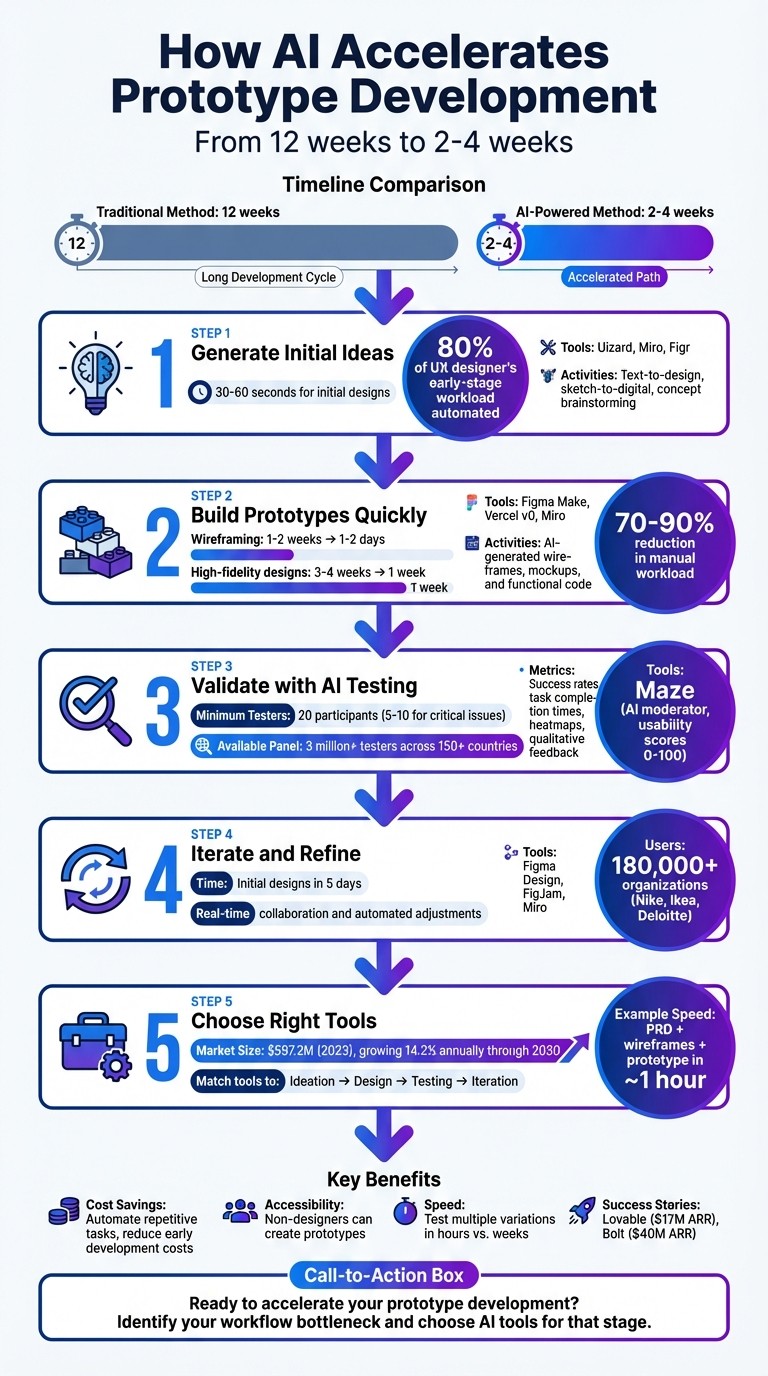
5-Step AI-Powered Prototype Development Process: From Ideation to Market-Ready MVP
I Put Every AI Prototyping Tool to the Ultimate Test
Step 1: Generate Initial Ideas with AI Tools
Transforming abstract ideas into visuals has never been easier. Instead of spending hours - or even days - on wireframes or waiting for designers to interpret your concepts, AI tools can create prototypes in seconds. This allows product managers, founders, and even non-designers to take on up to 80% of a UX designer's early-stage workload during the ideation phase, helping you launch your MVP in 45 days.
Turning Ideas into Visuals with AI
Text-to-design platforms like Uizard's Autodesigner make it simple: just describe your design goals, and the AI generates editable screens complete with layouts, buttons, and flows in 30 to 60 seconds. Elizabeth from DesignerUp summed up the experience:
"I can't believe I just watched AI turn a boring text prompt into a complete UI design and flow right before my eyes in seconds with Uizard".
You can also take a photo of a hand-drawn sketch and let the AI convert it into a digital mockup. The system identifies shapes - rectangles become buttons, circles turn into avatars - and transforms your brainstorming into editable components. For the best results, use bold, clear sketches. If you’re aiming for low-fidelity wireframes instead of polished designs, simply include the keyword "Hand-drawn" in your prompt.
Another option? Upload a screenshot of an app or website to extract its editable layout components. This is particularly handy for competitive research or when you want to build upon existing design patterns.
Once your initial visuals are ready, you can refine and explore your ideas further using AI.
Using AI for Concept Brainstorming
Before diving into visuals, AI can help you organize your thoughts. Tools like Miro and Figr offer ideation canvases that map out user problems, define success metrics, and generate user flows, ensuring your designs are grounded in context.
Generative AI can also suggest features, information architecture, and use cases based on your initial input. If you're unsure how to structure a dashboard or prioritize features, AI can break through creative blocks by offering multiple variations at once. The trick is to be specific with your prompts. Avoid vague terms like "modern design" and instead describe detailed elements: "a grid of product cards with images, titles, prices, and add-to-cart buttons".
Since AI tools often have limited context windows, it’s more effective to focus on generating small components or individual screens rather than requesting a fully developed application in one go.
Step 2: Build Prototypes Quickly with AI Design Platforms
After generating ideas, AI design platforms can turn those concepts into functional prototypes in as little as 2–4 weeks. These tools make prototyping accessible to everyone on the team, speeding up the process and creating more realistic prototypes with ease.
Create Wireframes and Mockups with AI
AI tools now handle much of the heavy lifting when it comes to wireframing and mockups. Instead of manually linking buttons to pages, platforms like Miro can automatically establish interactions and navigation flows, transforming static wireframes into clickable prototypes. This automation reduces wireframing time from 1–2 weeks to just 1–2 days.
What’s more, these tools empower team members - whether they’re product managers, engineers, or marketers - to visually bring ideas to life without needing advanced UI skills. A striking example of this occurred in July 2025 when Webflow’s design team used AI to create an AI Assistant prototype in under an hour.
"A prototype is worth a thousand meetings. There's something magical about building and showing how things actually feel, rather than just talking about them." - Kevin Grennan, Senior Staff Product Designer, Webflow
To get the best outcomes, start by defining your layout structure before adding specific functionalities. If you’re working with an established design system, upload visual references or screenshots - many AI tools can analyze these and produce UI elements that align with your brand’s look and feel.
Generate Advanced Visuals with AI
For more polished prototypes, AI tools can create high-fidelity designs that used to take weeks of designer effort. Platforms like Figma Make and Vercel v0 can convert static design files, screenshots, or even hand-drawn sketches into production-ready code and interactive interfaces. What once required 3–4 weeks can now be accomplished in just 1 week with AI, all while maintaining consistency with your existing design systems.
A great example of this is entrepreneur Aaron Veale, who in November 2025 used Figma Make to create a marketplace app for small growers in British Columbia. By leveraging AI, he took his idea from concept to a functional app in just a few weeks - an impressive feat for a solo founder.
To make the most of these tools, be specific in your prompts. Replace vague instructions like "modern design" with clear details about layouts, components, and interactions. You can also upload reference images or Figma frames to improve spatial and visual accuracy. This level of precision enabled teams like 918 Studio to build investor-ready prototypes in just 45 days.
Step 3: Validate Prototype Ideas with AI Testing Tools
Once you’ve got a working prototype, it’s time to test if it’s practical and meets market needs. AI-powered testing tools make this process smoother by automating the collection of data. They gather quantitative metrics like success rates and task completion times, as well as qualitative insights such as user feedback and recurring issues. This step helps you identify and fix major flaws early on, ensuring your prototype solves real user problems before moving to full development.
Use AI-Driven User Testing Platforms
Platforms like Maze simplify user testing by offering tools to measure usability. They provide insights like usability scores, track misclicks, and use heatmaps to show where users click or hesitate. Maze generates a usability score (from 0–100) based on data like task success rates, time spent, and errors, giving you a quick overview of how well your prototype performs.
A standout feature is the AI moderator, which conducts unmoderated interviews at scale. It asks follow-up questions tailored to each participant’s responses, uncovering the reasons behind user actions - without needing manual moderation.
"Maze's AI summarization and analysis is a big step up from other solutions we've tried. The quality of insights generated is mind-blowing and makes our interview analysis process much more effective".
For meaningful results, aim to test with at least 20 participants. However, even a smaller group of 5–10 can uncover critical usability issues. Maze also connects you to a global panel of over 3 million testers, covering both B2B and B2C markets across 150+ countries. If your prototype is built using tools like Figma Make, Lovable, or Bolt, you can embed a Maze tracking snippet to capture real-time interaction data.
While usability testing is essential, it’s only part of the puzzle. The next step is to ensure your prototype aligns with market needs.
Use AI for Market Fit Validation
After evaluating usability, focus on whether your design fits the market. AI tools can analyze research data and interview feedback to confirm that your prototype aligns with both user expectations and your business goals.
"AI can build prototypes in minutes, but can users navigate them? Speed alone doesn't guarantee usability".
A/B testing is a great way to compare different versions of your design, while five-second tests provide quick feedback on first impressions. These methods generate data on which design resonates most with your audience. Additionally, AI can review your research questions to ensure they’re free from bias, helping you gather cleaner and more actionable insights.
Leading teams now treat prototyping as an ongoing process rather than a one-time step. They test and refine every new feature as a prototype, allowing for continuous improvement. By combining usability and market fit validation, you ensure that your prototype not only functions well but also connects with your target audience.
At 918 Studio, we use these AI-driven validation techniques to rigorously test and refine prototypes. This approach shortens development timelines and ensures an optimized user experience.
Step 4: Iterate and Refine Prototypes with AI
Once your prototype has been validated, the next step is refining it through AI-powered iterations. These tools simplify the process by renaming layers, replacing placeholder text with actual content, and updating layouts with just a click. This automation frees up your team to focus on tackling more complex design challenges.
With AI workflows, what used to take 12 weeks can now be condensed into just 2–4 weeks. Initial designs can be generated in as little as 5 days, allowing for faster testing and quicker responses to feedback. This iterative cycle is a core part of any MVP launch checklist.
AI-Powered Collaboration for Iterative Design
AI doesn’t just automate - it also enhances collaboration. Many modern platforms now integrate real-time feedback directly into the design process, creating a seamless workflow.
For instance, tools like Figma Design, FigJam, and Figma Slides embed prototypes into shared workspaces. On January 22, 2026, Figma introduced this feature to streamline the feedback loop. Teams can now build, share, and refine designs in one centralized environment, eliminating the confusion of version control and endless file exchanges.
This setup also strengthens the connection between designers and engineers. AI-generated code serves as a starting point for discussions, allowing designers to present working prototypes instead of static mockups. Platforms like Miro take it a step further by transforming simple sticky notes and sketches into interactive prototypes. This helps non-designers visualize user journeys and collaborate with product teams, even without advanced design skills. Over 180,000 organizations - including Nike, Ikea, and Deloitte - use Miro for prototyping and collaborative innovation.
Automate Layout and Component Adjustments
AI tools like Figma's "Point and Edit" feature make refining layouts and components faster and more precise. With this tool, you can select specific elements - like text, images, or containers - and have the AI adjust properties such as padding, margins, or border radius without needing to fiddle with sliders manually. These changes are applied instantly, keeping the entire team on the same page.
If you modify or delete objects within a component, the AI ensures those changes are reflected across all instances automatically. Another time-saving feature is the ability to create prototyping connections and interactions between frames with minimal effort. Instead of manually linking buttons and screens, AI can handle these connections for you. For best results, it’s recommended to attach only one or two designs at a time to the AI prompt, rather than an entire flow.
"Preparation determines the outcome. Structured prompts turn AI from guesswork into a reliable design partner." - Figma Blog
To avoid losing progress, use version history to create checkpoints after each successful iteration. AI-driven changes can sometimes overwrite existing work, so having these checkpoints ensures you can revert to a previous version if needed.
At 918 Studio, these AI-powered iteration techniques have significantly sped up the refinement process, helping prototypes evolve from concepts to market-ready MVPs in record time.
Step 5: Choose the Right AI Tools for Your Workflow
After focusing on accelerated prototyping and iterative design, the final step is selecting AI tools that fit seamlessly into your workflow. The right tools can significantly impact your prototyping timeline. In 2023, the virtual prototype market was valued at $597.2 million and is expected to grow by 14.2% annually through 2030. With so many platforms available, the goal isn't to find a one-size-fits-all solution but to match tools to specific stages of your prototyping process and the roles within your team.
Match Tools to Workflow Stages
Each stage of prototyping has its own set of requirements, and different tools excel in different areas. For example:
Ideation: Tools like ChatGPT and Claude are great for synthesizing research and drafting initial requirements.
Design: Platforms such as Banani and Figr create polished, high-fidelity screens, while Uizard simplifies wireframing.
Testing: Maze and UserTesting automate the analysis of user insights.
Iteration: Tools like Bolt, v0.app, and Lovable generate production-ready code and adjust layouts through conversational prompts.
The choice of tools should also align with team roles. Founders and product managers often need tools that prioritize speed and versatility. Designers look for visual finesse and compatibility with tools like Figma, while engineers focus on clean, reusable React code and support for complex logic.
Once your workflow stages are mapped out, the next step is to zero in on the features that matter most.
Key Features to Look for in AI Prototyping Tools
After defining your workflow, consider these must-have features when evaluating AI tools:
Speed: This is a top priority. AI can dramatically reduce the time needed for prototyping. For instance, designer Xinran Ma used Claude for a product requirements document (PRD), UX Pilot for wireframes, and Bolt for a working prototype - all within about an hour.
Integration and Export Options: Tools that integrate with Figma or export production-ready React components can streamline the handoff process. Enterprise platforms like Retool go even further, offering features like @-mentioning data resources and inherited security permissions.
In some cases, a hybrid approach works best. AI tools can handle the initial scaffolding, while manual drag-and-drop refinements in visual editors add precision where needed. At 918 Studio, this combination has proven effective. Glen Coates from Shopify highlighted how screenshot-driven AI prototyping speeds up feedback cycles and quickly identifies less viable ideas.
Ultimately, the goal is to build a toolkit rather than rely on a single tool. Start with AI for rapid groundwork, then refine manually to ensure the final product meets your standards. With the right toolkit in place, you'll be well-positioned for a smooth transition to developing a market-ready MVP.
Conclusion
Prototyping timelines that once stretched to 12 weeks can now be condensed to just 2–4 weeks with the help of AI. From brainstorming ideas to refining iterations, every step of the process benefits from AI's ability to speed things up and streamline workflows.
Key Benefits of AI-Powered Prototyping
AI has made prototyping more accessible, even for team members without technical expertise. With AI tools, functional demos can be created quickly, allowing teams to validate ideas and develop concepts simultaneously without relying heavily on engineering resources.
Another major advantage is cost reduction. By automating repetitive tasks like boilerplate code and UI generation, AI saves teams valuable engineering hours during the early stages of development. For instance, companies like Lovable and Bolt have seen incredible growth - reaching $17 million and $40 million in annual recurring revenue, respectively, within just a few months - all thanks to AI-enhanced prototyping. Teams can now test multiple design variations in a single hour instead of spending weeks on just one, helping to identify and eliminate weak ideas before they drain resources.
These advantages make a strong case for incorporating AI into your prototyping strategy.
Next Steps for Businesses and Entrepreneurs
To make the most of these benefits, start by pinpointing the stage in your workflow - whether it's ideation, design, testing, or iteration - that could use the most improvement. Then, select AI tools tailored to address those specific needs. Remember, in the early stages of prototyping, prioritize functionality and user experience over visual polish; you're testing how it works, not how it looks.
For businesses looking to accelerate their development process, 918 Studio offers expertise in AI-powered, no-code, and low-code solutions. They help startups and companies build market-ready MVPs in as little as 45 days. Whether you need a functional prototype, a SaaS platform, or scalable support, 918 Studio combines AI's efficiency with skilled execution. Visit 918studio.com to see how AI-driven prototyping can fast-track your next big idea.
FAQs
How does AI speed up the process of developing prototypes?
AI simplifies the process of prototype development by automating essential tasks such as generating ideas, designing wireframes, and creating high-fidelity designs. With these tools, teams can turn concepts into functional prototypes in a fraction of the usual time - shaving development cycles down from months to just weeks or even days.
This rapid turnaround allows businesses to test ideas more efficiently, iterate quickly, and dedicate more energy to perfecting their product instead of getting stuck in drawn-out design phases. The result? Faster delivery of new solutions to the market at a reduced cost.
How can AI help non-designers create prototypes more easily?
AI-powered tools have transformed the way non-designers approach prototyping by automating intricate tasks and making the design process more straightforward. For instance, some tools can create low-fidelity wireframes or high-fidelity prototypes based on a few simple prompts. This eliminates the need for deep coding knowledge or advanced design skills.
These tools also help speed up workflows by enabling quick iterations. Users can refine their concepts more efficiently, bringing them closer to a polished product. Whether you're sketching an initial idea or developing a fully interactive prototype, AI makes the process faster and more accessible for everyone.
How does AI make user testing and feedback collection easier?
AI takes the hassle out of user testing and feedback collection, making the process quicker, sharper, and more effective. It can create realistic data for prototypes, allowing users to assess designs without the need to manually generate data. On top of that, AI can automatically analyze user interactions and feedback, spotting patterns and areas that need improvement in a fraction of the time it used to take. What once required days can now be done in just hours.
AI-powered tools also make it easier to update designs based on feedback. Teams can test multiple variations and tweak them in real time. Features like automatic interaction generation and collaborative editing ensure feedback is actionable, and changes are implemented seamlessly. By turning user testing into a faster, data-driven process, AI lets teams refine their prototypes with far less effort.
Related Blog Posts

Contact us
(913) 308-8878